ID: #013/Localized Network Performance Degradation - Browser Resource Bloat
Ticket Details
- Priority: Medium
- Category: Network
- Time to Resolve: 20 mintues
User's Report
"My internet is incredibly slow today. Everyone else in the office says theirs is fine, but it takes me 5 minutes just to open a single webpage. I can’t get any work done like this."
My Troubleshooting Process
[13:30] - INITIAL CHECK | VERIFY THE ISSUE
- Accessed the user's workstation locally.
- Performed a baseline Speed Test: Results showed 2.3 Mbps Download / 1.5 Mbps Upload via Ethernet.
- Cross-referenced with a neighboring workstation on the same VLAN: Results showed 98.2 Mbps Download / 20.4 Mbps Upload via Ethernet.
- Confirmed the issue is isolated to the specific hardware/software configuration of the user’s PC.
- Checked for active background Windows Updates; none were found.

[13:50] - FOLLOW UP TROUBLESHOOTING | RESOLUTION
- Investigated the primary browser (Chrome) and discovered 47 active extensions.
- Accessed the browser storage settings and found 12.4 GB of cached data and temporary files.
- Cleared the entire browser cache and cookies to refresh the application state.
- Disabled 44 non-essential extensions after consulting with the user on their daily workflow.
- Re-ran the Speed Test: Results improved to 95.6 Mbps Download, matching the rest of the office.
- Educated the user on how browser extensions consume RAM and CPU cycles, which can simulate "slow internet" even on a fast connection.
Resolution & Communication
[13:30] - INITIAL CHECK | VERIFY THE ISSUE
- Accessed the user's workstation locally.
- Performed a baseline Speed Test: Results showed 2.3 Mbps Download / 1.5 Mbps Upload via Ethernet.
- Cross-referenced with a neighboring workstation on the same VLAN: Results showed 98.2 Mbps Download / 20.4 Mbps Upload via Ethernet.
- Confirmed the issue is isolated to the specific hardware/software configuration of the user’s PC.
- Checked for active background Windows Updates; none were found.
[13:50] - FOLLOW UP TROUBLESHOOTING | RESOLUTION
- Investigated the primary browser (Chrome) and discovered 47 active extensions.
- Accessed the browser storage settings and found 12.4 GB of cached data and temporary files.
- Cleared the entire browser cache and cookies to refresh the application state.
- Disabled 44 non-essential extensions after consulting with the user on their daily workflow.
- Re-ran the Speed Test: Results improved to 95.6 Mbps Download, matching the rest of the office.
- Educated the user on how browser extensions consume RAM and CPU cycles, which can simulate "slow internet" even on a fast connection.
My response to user:
"Hi,
I’m following up to let you know that we’ve successfully resolved the speed issues on your computer.
During our investigation, we found that your browser had accumulated over 12GB of temporary files and had nearly 50 active extensions running in the background. These extensions were "fighting" for your computer’s resources, which made your high-speed internet feel like a slow connection.
We have cleared the cache and streamlined your browser by disabling the unnecessary add-ons. Your connection is now running at 95 Mbps, which is the full speed of our office network.
Your computer should feel much snappier now! If you notice things slowing down again, or if you find you’re missing a specific tool you needed, just let me know.
Best regards,"
As Documented in Spiceworks
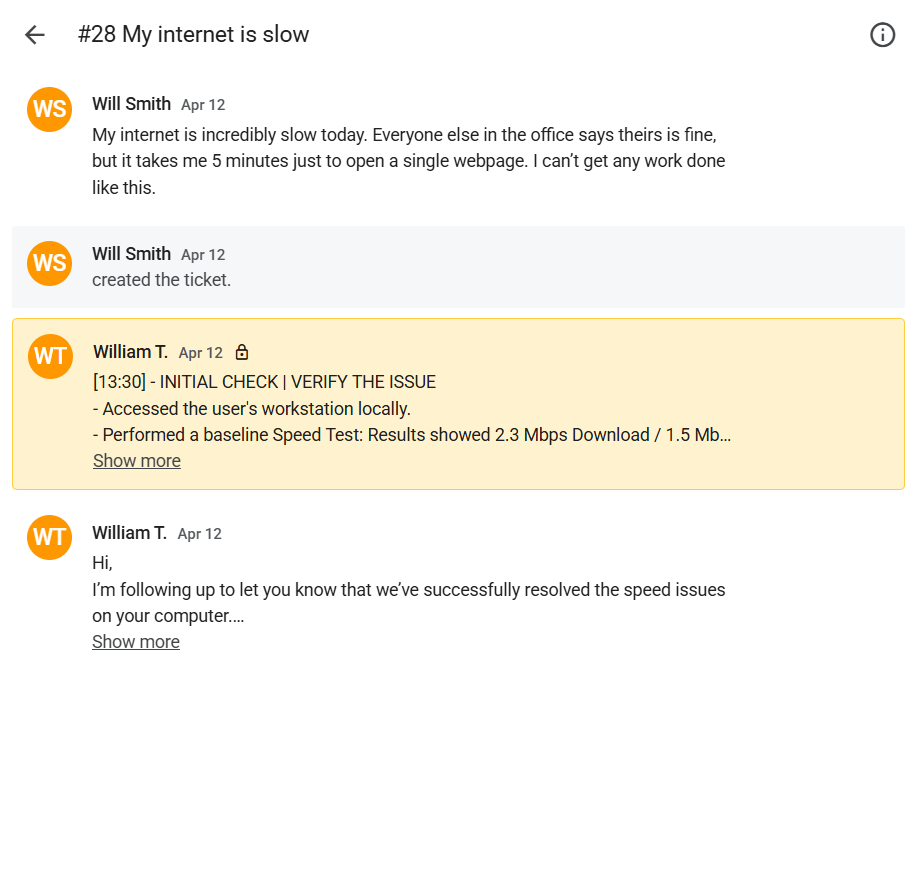
Screenshot: Complete ticket view in Spiceworks showing ticket flow and documentation (click to view full size)