ID: #012/File Access Failure - Incorrect SSID Association
Ticket Details
- Priority: High
- Category: Network
- Time to Resolve: 15 mintues
User's Report
"I'm getting a 'Network path not found' error when trying to open \FileServer\Marketing. I need access to our campaign files ASAP for a client meeting. Please help!"
My Troubleshooting Process
[11:00] - INITIAL CHECK | VERIFY THE ISSUE
- Connected to the user's workstation via Remote Desktop using their local IP.
- Attempted to manually navigate to \\FileServer\Marketing and reproduced the "Network path not found" (Error code: 0x80070035).
- Opened Command Prompt and attempted to ping FileServer, received "Request timed out,".

[11:15] - ASSESSMENT
- The workstation is not connected to the server.

[11:15] - FOLLOW UP TROUBLESHOOTING | RESOLUTION
- Investigated network settings and noticed the laptop was connected to "GuestWiFi_Public".
- Disconnected from the Guest network and joined "CompanyWiFi_Secure" using the user's domain credentials.
- Re-ran the ping command to FileServer and received a successful response (0% packet loss).
- Successfully mapped the M: drive to the \Marketing share and verified the user could open and edit campaign files.
- Called the user to confirm they had access and explained that the File Server is restricted to the Secure WiFi for safety.
- Educated the user on the difference between the Guest and Corporate networks to prevent future lockouts.
Resolution & Communication
[11:00] - INITIAL CHECK | VERIFY THE ISSUE
- Connected to the user's workstation via Remote Desktop using their local IP.
- Attempted to manually navigate to \\FileServer\Marketing and reproduced the "Network path not found" (Error code: 0x80070035).
- Opened Command Prompt and attempted to ping FileServer, received "Request timed out,".
[11:15] - ASSESSMENT
- The workstation is not connected to the server.
[11:15] - FOLLOW UP TROUBLESHOOTING | RESOLUTION
- Investigated network settings and noticed the laptop was connected to "GuestWiFi_Public".
- Disconnected from the Guest network and joined "CompanyWiFi_Secure" using the user's domain credentials.
- Re-ran the ping command to FileServer and received a successful response (0% packet loss).
- Successfully mapped the M: drive to the \Marketing share and verified the user could open and edit campaign files.
- Called the user to confirm they had access and explained that the File Server is restricted to the Secure WiFi for safety.
- Educated the user on the difference between the Guest and Corporate networks to prevent future lockouts.
My response to user:
"Hi, I am following up to confirm that your access to the Marketing network drive has been restored.
During our troubleshooting session, we identified that the 'Network path not found' error was occurring because your laptop was connected to the Guest WiFi. For security reasons, internal file servers are only accessible via the Secure Corporate WiFi.
We have successfully switched your connection to the secure network and verified that you can now open and edit your campaign files. I’ve also ensured the drive is properly mapped for you.
I’ll be closing this ticket now, but please feel free to reach out if you have any other questions before your meeting!
Best regards,"
As Documented in Spiceworks
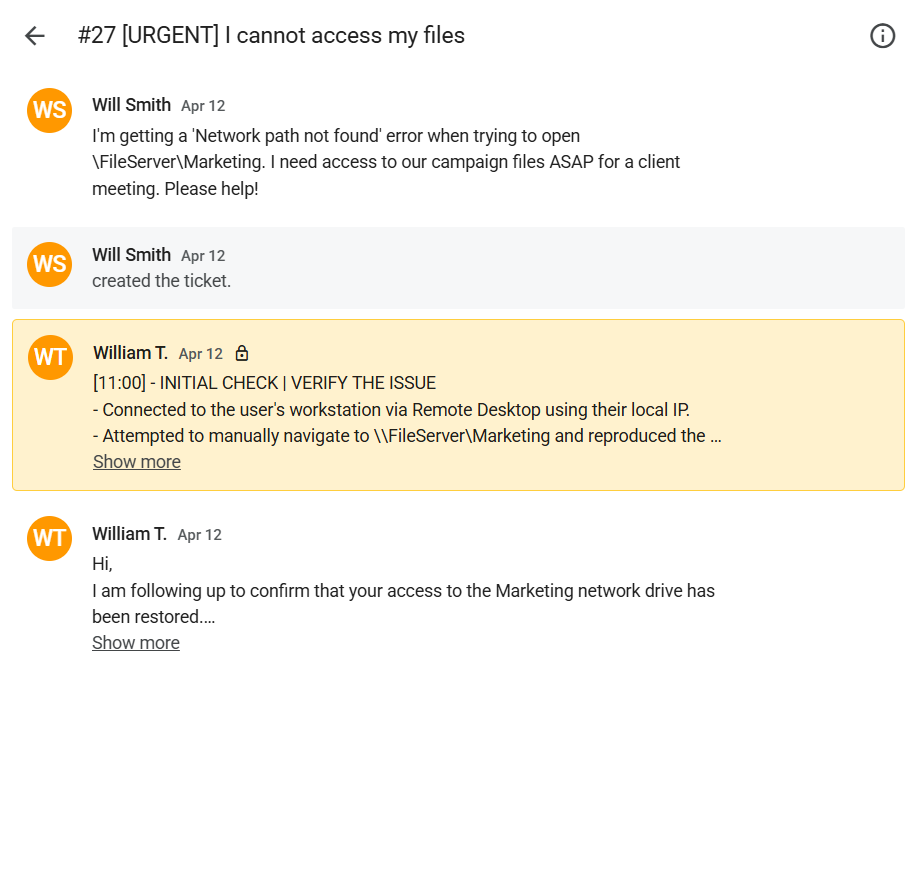
Screenshot: Complete ticket view in Spiceworks showing ticket flow and documentation (click to view full size)