ID: #011/Wireless Instability - Driver Configuration
Ticket Details
- Priority: Medium
- Category: Network
- Time to Resolve: 15 mintues
User's Report
"My laptop keeps losing WiFi connection every 15-20 minutes. I have to reconnect manually each time. Very frustrating!"
My Troubleshooting Process
[10:00] INITIAL CONTACT | VERIFY ISSUE
- Started a Remote Desktop Session with the user
- Verified the driver version (Device Manager, Network Adapter, Driver tab (in Properties))
- Noticed the driver's version is outdated, started the update

[10:15] RESOLUTION
- After the update, stable connectivity verified
Resolution & Communication
[10:00] INITIAL CONTACT | VERIFY ISSUE
- Started a Remote Desktop Session with the user
- Verified the driver version (Device Manager, Network Adapter, Driver tab (in Properties))
- Noticed the driver's version is outdated, started the update
[10:15] RESOLUTION
- After the update, stable connectivity verified
My response to user:
"Hi,
I’m following up to confirm that your WiFi connectivity issues have been resolved.
During our remote session, we identified an outdated network driver as the cause of the intermittent dropouts. After performing the update, we verified that the connection is now stable.
I’ll be closing this ticket now, but please don’t hesitate to reach out if you experience any further issues.
Best regards,"
As Documented in Spiceworks
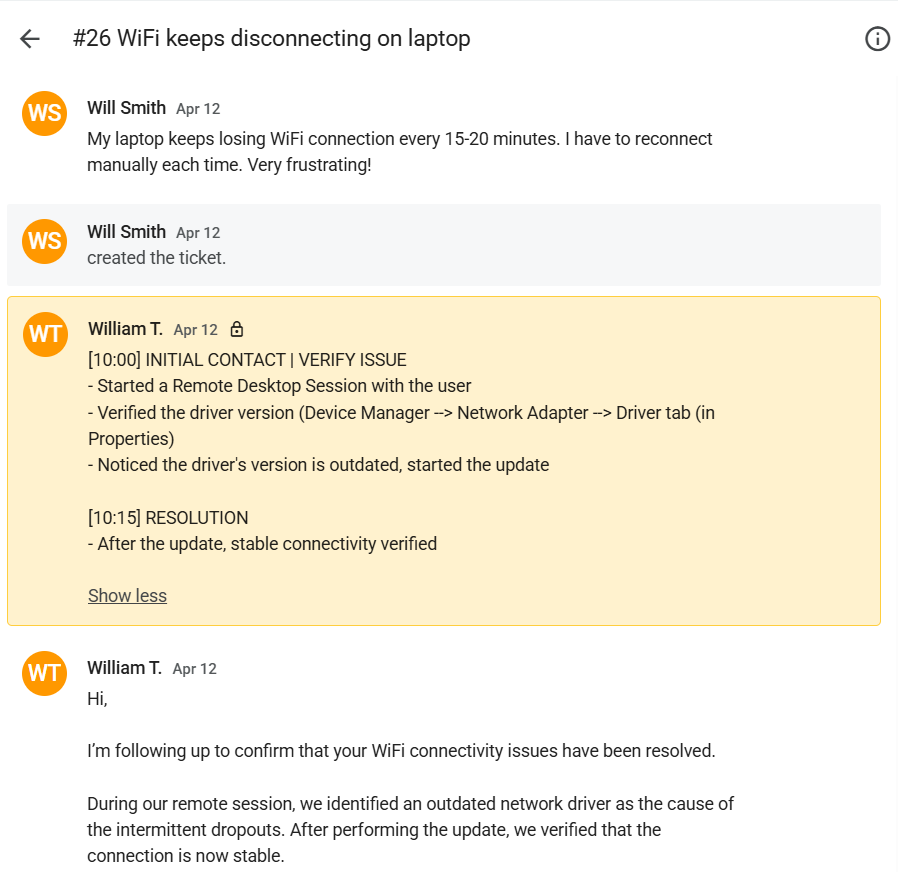
Screenshot: Complete ticket view in Spiceworks showing ticket flow and documentation (click to view full size)