ID: #009/Sudden System Shutdown & Data Loss Recovery
Ticket Details
- Priority: High
- Category: Other/Power
- Time to Resolve: 2 hour
User's Report
"I was working on a legal document for 4 hours straight. And the laptop I was using suddenly turned off. I need help recovering my files. This is important files for the company, need help quick."
My Troubleshooting Process
[14:00]  INITIAL CONTACT | VERIFY ISSUE
- Gather information from the user; they did not click the Save button from start to finish
- They were disconnected from the Internet; no cloud, sync, or auto backup was found on their system
- Tried looking for Windows Restore Point, the last point was created last week, they just started on the document today
- Quick assessment: Cannot recover the file, moving on to reproduce and prevent the problem

[15:00] GATHERING MORE INFORMATION ABOUT THE SYSTEM SHUTDOWN
- Accessed Event Viewer, noticed ID 41 was logged, verified system shutdown
- The laptop AC adapter was intact, the socket was firm, no visible damage to the charging port, and verified good hardware
- Got battery report through Command Prompt by using powercfg /batteryreport, battery health was reported as "Good" and was operate as 89% of its designed capacity
- The report showed battery percentage dropped steadily until "Shut down" and then went back up gradually to 100% after some time
- Quick Assessment: The user may have forgotten to plug the power cable in while using the laptop

[16:00] PREVENTIVE MEASURE
- Went to Control Panel, accessed Power Options, selected Change plan settings, selected Advanced power settings, then set Low Battery Level to 20% and Critical Battery Level to 5%
- Enabled Low Battery Notification
- Informed the user about the stage of their documentation (cannot recover), and educational details about volatile memory, power management, and the OneDrive AutoSave feature
- The user was unhappy and requested to escalate the ticket, escalated the ticket to higher tier technician
Resolution & Communication
[14:00] INITIAL CONTACT | VERIFY ISSUE
- Gather information from the user; they did not click the Save button from start to finish
- They were disconnected from the Internet; no cloud, sync, or auto backup was found on their system
- Tried looking for Windows Restore Point, the last point was created last week, they just started on the document today
- Quick assessment: Cannot recover the file, moving on to reproduce and prevent the problem
[15:00] GATHERING MORE INFORMATION ABOUT THE SYSTEM SHUTDOWN
- Accessed Event Viewer, noticed ID 41 was logged, verified system shutdown
- The laptop AC adapter was intact, the socket was firm, no visible damage to the charging port, and verified good hardware
- Got battery report through Command Prompt by using powercfg /batteryreport, battery health was reported as "Good" and was operate as 89% of its designed capacity
- The report showed battery percentage dropped steadily until "Shut down" and then went back up gradually to 100% after some time
- Quick Assessment: The user may have forgotten to plug the power cable in while using the laptop
[16:00] PREVENTIVE MEASURE
- Went to Control Panel, accessed Power Options, selected Change plan settings, selected Advanced power settings, then set Low Battery Level to 20% and Critical Battery Level to 5%
- Enabled Low Battery Notification
- Informed the user about the stage of their documentation (cannot recover), and educational details about volatile memory, power management, and the OneDrive AutoSave feature
- The user was unhappy and requested to escalate the ticket, escalated the ticket to higher tier technician
My response to user:
"Hi,
I have completed a deep-system diagnostic regarding the sudden shutdown of your laptop and the status of your document.
Investigation Results:
Hardware Health: I have verified that your AC adapter, charging port, and battery are all in good physical and functional condition.
Root Cause: System logs and battery telemetry indicate that the laptop reached a 0% power state, triggering an emergency shutdown. Because the document was being stored in the system's temporary memory (RAM) and had not yet been saved to the hard drive or cloud, the data was cleared when the power was lost.
Recovery Status: After searching all local temporary directories and system restore points, I have determined the file is unrecoverable at the local support level.
Actions Taken:
System Optimization: I have adjusted your power settings to provide a Low Battery Warning at 20% to ensure you have ample time to connect to power in the future.
Escalation: Per your request, I have escalated this ticket to our Tier 2 Senior Technical Team for a final review to see if specialized forensic recovery tools can retrieve any fragments of the data.
An engineer from the senior team will reach out to you shortly with their final verdict.
Best regards,"
As Documented in Spiceworks
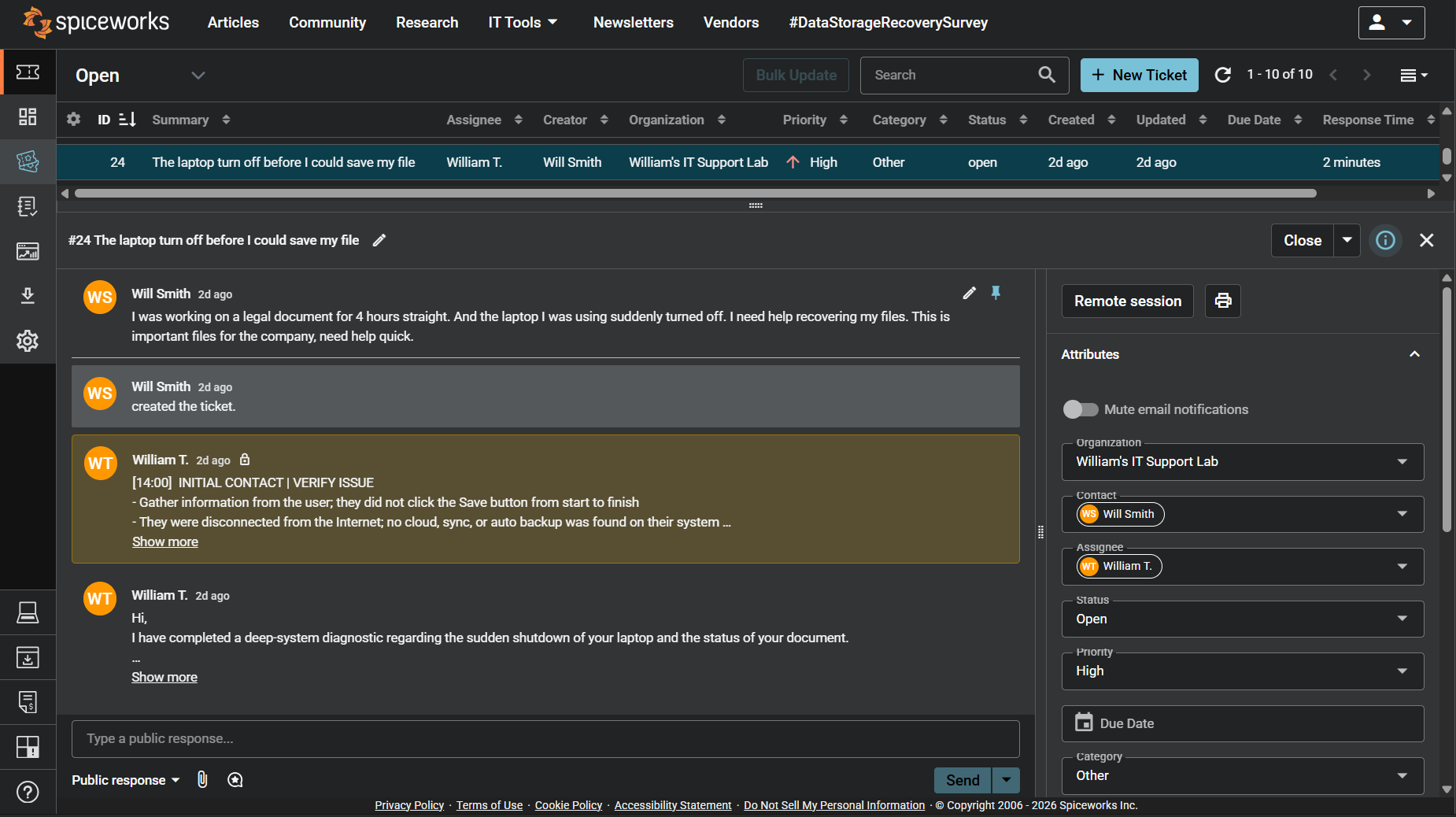
Screenshot: Complete ticket view in Spiceworks showing ticket flow and documentation (click to view full size)